

Interactive Cemetery Map
Welcome to the City of Emmett's
Interactive Cemetery Map page!
To view the map, please click here or on the picture below.

In order to search for specific burial plots, please follow the guide below!
Please note, these steps are for searching on a computer. Due to an update to the mapping software, we are currently looking into methods for searching on mobile devices such as phones and tablets.
Step 1: Near the top of the left menu bar on the side of the map, select the Layers button, which has the icon of three squares stacked on each other.

Step 3: Off the right edge of the map there is another long menu. Select the Filter button, which should be third from the top and resembles a funnel. This should open a larger Filter window.

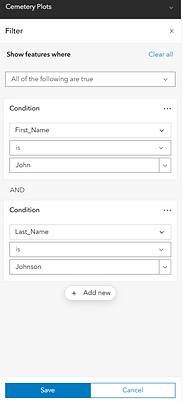
Step 5: You can add multiple conditions to narrow your search by clicking "Add New" again. This time we have added a Last Name search for "Johnson". Once you have your search terms, click the blue "Save" button at the bottom.
Step 2: To the right of the Cemetery Plots layer, click on the three-dot menu, and select Show Table.

Step 4: Click "Add New" to add a search condition. You can chose from various options, such as First Name, Last Name, and more. You can then type in what you want to search for on the third textbox - in this case we have typed "John".

Step 6: Once you click save, the Table from Step 2 should have narrowed down to what you are searching for, in this case we have found one instance of a "John Johnson". The map itself should also clear any burial plots that do not meet your desired search. If you wish to start over, open the Filter menu again and select the blue "Clear All" button at the top right the Filter menu, and start again from Step 4.

Step 7: To find the location of the burial plot you have searched for, click the checkbox to the left of the First Name in the table, and then the "Zoom to selection" button to the top left of the checkbox, with the icon of four arrows pointing to a small circle, and the map will center on the burial plot.
